Note: This post was originally written in 2021, but I have since updated it to reflect the latest changes in HuggingFace Accelerate (last update November 2025 using accelerate==1.11.0).
For a grad course that recently concluded, the course project required me to train and evaluate a large number of models. Our school’s local SLURM cluster has new GPUs that support fp16, which meant I could take advantage of PyTorch’s Automatic Mixed Precision (AMP) training. And honestly, there is no reason not to use it: we get reduced memory usage, faster training, and all of this without virtually any loss in performance.
What kept me from trying to use AMP in native PyTorch was how verbose the edits seemed to be. One solution to this is the seemingly very popular, including in my lab, PyTorch Lightning: Lightning offers built-in flags that make mixed-precision training very easy to implement, but using Lightning seemed to require refactoring a lot of my code.
So my preferred “middle ground” was to use HuggingFace 🤗 Accelerate: it allows me to keep my own native PyTorch (training) loops, yet with minimal code changes, I can enable mixed-precision and multi-GPU training.
Update: PyTorch Lightning now offers Lightning Fabric, which, from a quick look, appears to be quite similar to 🤗 Accelerate and does not require nearly as much refactoring as Lightning.
Here is a screenshot of 🤗 Accelerate’s “pitch”, right from their own docs:
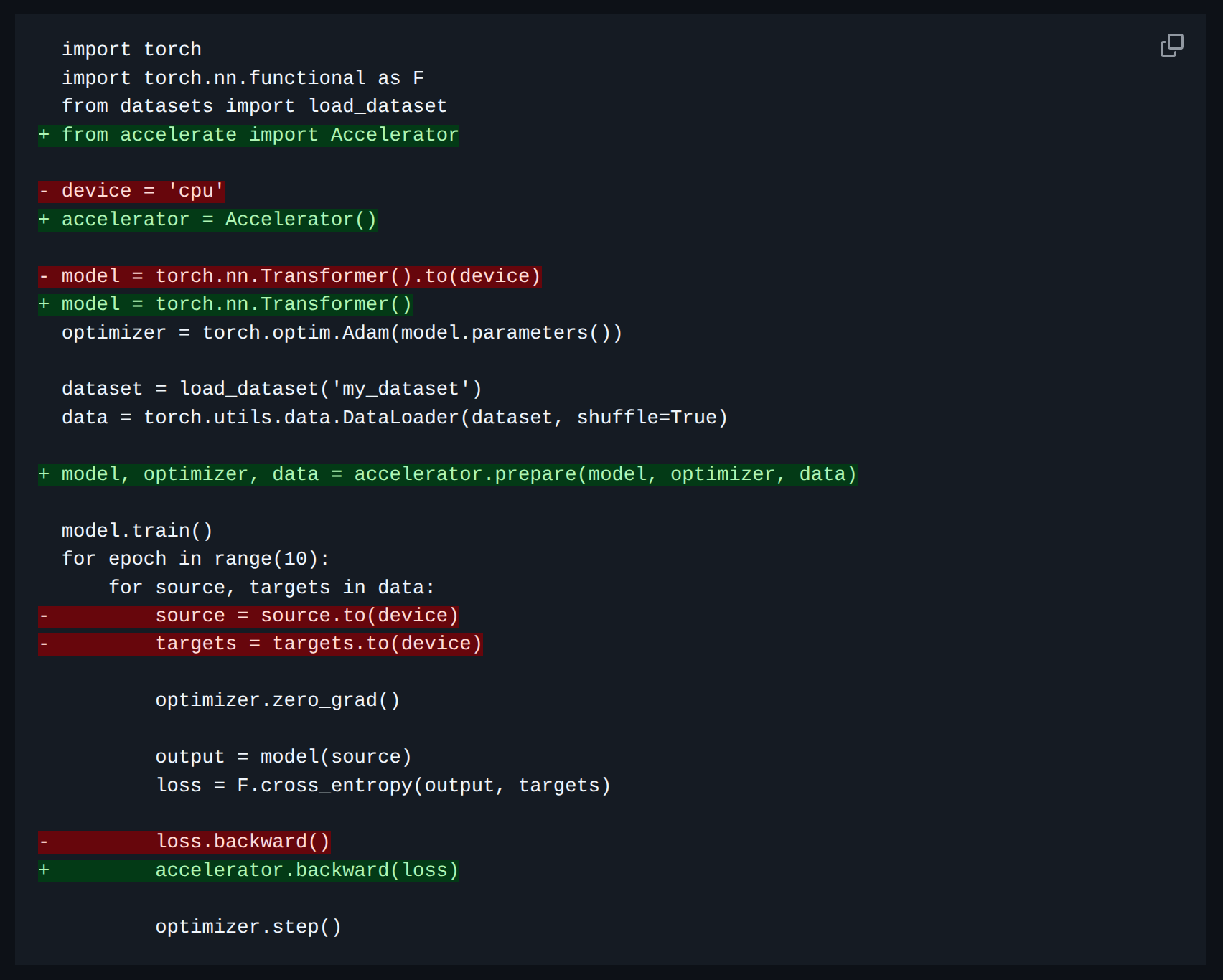
So here is a brief write-up of how I used it. At a high-level, we make these four changes:
- Initialize an
Acceleratorobject from 🤗 Accelerate - Prepare the objects for 🤗 Accelerate: this includes the model, the dataloader, the optimizer, and the scheduler.
- In the training loop:
- remove manual
.to(device)call(s). If necessary, replace withaccelerator.to_device()call(s). - update the
.backward()call(s).
- remove manual
- [Optional] Update how the checkpointing is done.
Details of each step are below with example code snippets.
I. Setup and initialization
Instead of manually checking for/specifying CUDA devices, we can simply instantiate an Accelerator object from 🤗 Accelerate. Do this at the top of the script, and this is also where we specify the precision type (fp16, bf16, etc.). As simple as that.
from accelerate import Accelerator

# Instantiate with mixed precision (can choose from fp16, bf16, etc.)
accelerator = Accelerator(mixed_precision="fp16")
II. prepare()-ing the objects for 🤗 Accelerate
As “black box” as this step may seem, it is very important yet very simple. We need to pass the objects: model, optimizer, scheduler, dataloader(s) to accelerator.prepare(). This hadnles the device placement and mixed precision for us.
model = MyModel()
optimizer = torch.optim.SGD(model.parameters(), lr=0.01)
train_loader = ...
val_loader = ...

# "Prepare" the objects for 🤗 Accelerate
model, optimizer, train_loader, val_loader = accelerator.prepare(
    model,
    optimizer,
    train_loader,
    val_loader
)
III. Changes to the training loop
There are two changes we need to make to the training loop: removing manual device placement and updating the .backward() call(s).
 1for batch in train_loader:
 2    optimizer.zero_grad()
 3    inputs, labels = batch
 4    # Remove manual `.to(device)` calls.
 5    # inputs, labels = inputs.to(device), labels.to(device)
 6
 7    # Forward pass.
 8    outputs = model(inputs)
 9    loss = criterion(outputs, labels)
10
11    # Backward pass.
12    # Update the `.backward()` call.
13    # loss.backward()
14    accelerator.backward(loss)
15
16    # Update the optimizer.
17    optimizer.step()
IV. [Optional] Update how the checkpointing is done.
When using 🤗Accelerate, the model is wrapped in an Accelerator object, and potentially in a DataParallel or DistributedDataParallel object. This means that to save the model weights correctly, we first need to “unwrap” the model. Here is how model checkpointing can be updated:
accelerator.wait_for_everyone()

# Unwrap the model.
unwrapped_model = accelerator.unwrap_model(model)

# Save the model weights.
torch.save(unwrapped_model.state_dict(), "best_model.pth")
Later, when loading the model weights for inference or fine-tuning, we need to unwrap the model again to ensure that the keys match the state dict.
model = MyModel()

...

# Loading the model weights.
unwrapped_model = accelerator.unwrap_model(model)
unwrapped_model.load_state_dict(
    torch.load("best_model.pth"),
    map_location=accelerator.device
)
model.eval()
The good thing about using 🤗 Accelerate is that if we need to later switch from a single GPU to multiple GPUs, we don’t need to change any of the training code, only the initialization of the Accelerator object.
Please see an example of full training and testing code with PyTorch + 🤗 Accelerate.